How to share my address book?
To share an address book, go to "Address book", click the menu next to the relevant address book, select "Share", enter your colleague's e-mail, and choose their role (read-only or read/write).
How to share my address book?
To share an address book with a colleague, follow these few simple steps:
-
Access the "Address book" section from the left-hand menu.
-
In the left-hand column, under "My address books", find the address book you want to share and click on the menu icon (≡) next to its name.
-
Select "Share", then enter the e-mail address or name of the colleague you want to share this address book with.
-
Choose the role to assign them:
-
Read-only: your colleague can view the contacts in the address book, without being able to modify them.
-
Read/write: your colleague can view, add, and modify the contacts in the address book.
-
-
Confirm the sharing. The address book will then appear in the "Shared address books" section for your colleague.
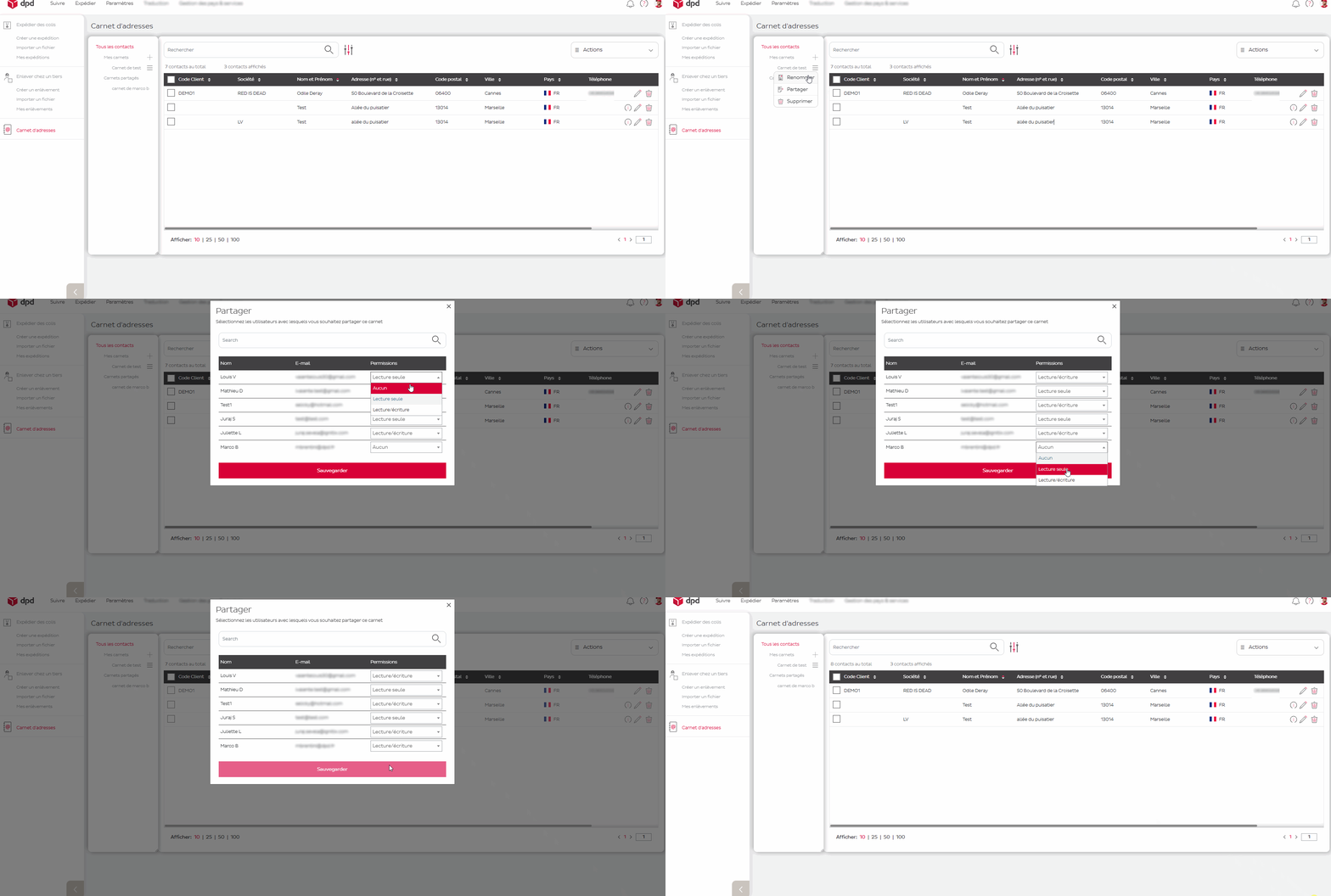
💡 You can change a colleague's role or remove their access at any time from the same menu.
Parcel delivery for businesses and private customers / How to share my address book?